Why Is My Bulb Flashing? Practical Troubleshooting Guide
Discover why your bulb is flashing and how to fix it quickly. This Bulb Fix guide covers common causes, safe troubleshooting steps, and prevention tips for homeowners.


Most flashing bulbs can be fixed quickly. If you’ve asked why is my bulb flashing, the usual culprits are a loose connection, an incompatible dimmer, or a faulty ballast. Begin by reseating the bulb, then inspect the socket for corrosion and replace if needed. If the problem continues, check for circuit overloads or switch to a compatible bulb-dimmer pairing.
Why bulbs flash: common causes
When a bulb suddenly flickers or flashes, it's usually signaling a simple electrical issue rather than a mysterious fault. If you’re wondering why is my bulb flashing, start with the basics: a loose connection at the bulb or socket, a bulb that’s not fully seated, or a fixture that’s dirty or corroded. Another frequent cause is dimmer incompatibility — many LED bulbs don’t pair well with older, incompatible dimmer switches. Wiring wear, a frayed cord, or a failing ballast can also produce flashing. Each cause has a practical fix that a confident homeowner can perform safely with the right precautions. Remember: working near live electrical components can be dangerous, so turn off power at the breaker before inspecting anything.
This section translates symptoms into practical checks you can perform now. By focusing on the most common culprits first, you can usually stop the flashing without professional help. Bulb Fix emphasizes safe handling and knowing when to escalate to a licensed electrician if the issue involves wiring or high-current circuits.
How to diagnose flashing bulbs: quick checks
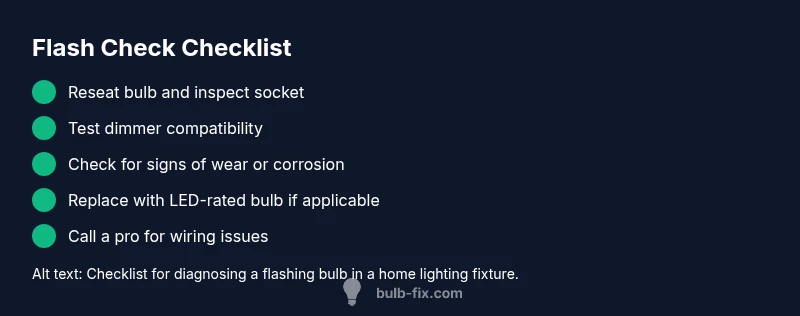
To diagnose flashing bulbs, start with simple, repeatable checks that don’t require special tools. First, switch off the circuit at the breaker and wait a moment to allow any stored energy to dissipate. Remove and reseat the bulb firmly, then twist slightly to ensure the threads are clean and contact points are touching. If you have multiple bulbs on the same circuit, test a single bulb in a known-good socket. Check the fixture for loose screws, damaged sockets, dust buildup, or corrosion along metal threads. Inspect for flicker patterns: does it occur with all bulbs or only with LEDs? If it only happens with LEDs, dimmer compatibility is a likely culprit. If the flicker is persistent across bulbs and fixtures, there may be a control issue or supply irregularity that needs further diagnosis.
Safety first: power down and PPE
Safety is non-negotiable when troubleshooting electrical issues. Always power down at the circuit breaker before handling any bulb, socket, or fixture. If you must use tools, wear insulated gloves and avoid touching metal contacts directly. Never attempt to bypass safety devices or work on energized circuits. If a breaker trips repeatedly or you notice scorch marks, buzzing sounds, or a warm fixture, stop immediately and call a licensed electrician. Bulb Fix recommends documenting any signs of wear or heat and routing the information to a professional to speed up the diagnostic process.
Replacing with the correct bulb type: match matters
Incorrect bulb type is a frequent reason for flashing. Check the bulb label for wattage, voltage, base type, and whether it’s rated for dimming. If you’re upgrading from incandescent to LED, ensure the fixture and dimmer are compatible. Some LED bulbs work with older dimmers, but many require a dimmer-friendly driver. When replacing, select a bulb with the same base type and a voltage rating that matches your circuit. If a ballast is involved (common in fluorescent fixtures), consider whether it needs replacement or retrofitting with a ballast-compatible LED kit.
This approach minimizes wasted replacements and keeps your lighting setup safe and predictable. Bulb Fix notes that maintaining consistent bulb-base compatibility reduces the likelihood of recurring flashing.
Inspect key components: socket, ballast, and dimmer
Beyond the bulb itself, the socket and wiring can cause flickering. Look for burnt smells, melted insulation, bent or loose terminals, or corrosion around the socket’s metal contacts. If you’re dealing with fluorescent fixtures, a failing ballast can cause persistent flashing and buzzing. Dimmer switches add another layer of complexity: older dimmers may not provide smooth current control for modern LED bulbs. If you suspect the dimmer, try a bulb that’s labeled “dimmable” and compatible with your dimmer type, or replace the dimmer with a model rated for LED loads.
This section helps you decide whether to repair or replace components rather than swap bulbs again and again. Safety first: never work with exposed conductors or live wiring.
When to call a licensed electrician
If you notice signs of scorching, persistent buzzing, or breakers tripping when the light is on, stop troubleshooting and seek professional help. Complex issues such as wiring faults, overloaded circuits, or legacy electrical panels require a licensed electrician. Even if the problem seems minor, a professional can confirm whether your fixture meets current electrical codes and whether an upgrade is prudent for safety and reliability. Early professional input can prevent fire hazards and provide long-term peace of mind.
Prevention tips to avoid future flashing
Prevention is easier than repair. Use bulbs that match fixture compatibility, especially when switching to LEDs. Replace aging fixtures and damaged sockets, and avoid overloading circuits with too many high-wattage bulbs. Keep fixtures clean to prevent heat buildup, and consider upgrading to dimmer-compatible LEDs if you rely on dimming scenes. Regularly inspect outlets, cords, and sockets for wear, and keep a simple maintenance log so you know when a fixture was last serviced. Consistent care reduces the chances of unexpected flashing.
Choosing the right bulb and dimmer combo
Compatibility matters when building a reliable lighting setup. If you plan to use LED bulbs, verify the dimmer’s minimum load, type (electronic vs. magnetic), and label compatibility. A mismatch between the dimmer and LED driver can cause flashing, flicker, or reduced performance. When replacing, consult the fixture’s manual and bulb packaging for compatibility notes. If you’re unsure, reach out to a trusted retailer or an electrician for a quick compatibility check.
Steps
Estimated time: 40-60 minutes
- 1
Power down and prepare
Turn off the breaker supplying the fixture and unplug any connected lamps. Wear insulated gloves and use a non-contact tester to confirm no voltage is present before touching components.
Tip: Label the circuit to avoid re-energizing by mistake. - 2
Reseat the bulb
Remove the bulb fully, inspect the base for dirt or corrosion, and reseat firmly. If the base or threads look damaged, replace the bulb holder or socket first.
Tip: Choose a fresh bulb with the same base type and rating. - 3
Test with a known-good bulb
Install a bulb you know works in another fixture to determine if the issue is bulb-specific or fixture-related.
Tip: Stay mindful of wattage limits specified for the fixture. - 4
Check dimmer compatibility
If you use a dimmer, verify that the bulb is dimmable and that the dimmer supports the bulb type (LED, incandescent, etc.). Replace the dimmer if necessary.
Tip: Avoid mixing old dimmers with LEDs unless rated for it. - 5
Inspect wiring and ballast
Look for frayed wires, burnt marks, or a buzzing ballast. Replace wiring or ballast if you identify wear or overheating.
Tip: Only handle ballast replacements if you are comfortable with ballast replacement procedures. - 6
Re-energize and observe
Restore power and observe the fixture for a full testing cycle of several minutes. If flashing recurs, step back and consider professional assessment.
Tip: Document symptoms and steps taken to speed up expert help.
Diagnosis: Bulb flashing intermittently after installation
Possible Causes
- highLoose bulb or socket connection
- highIncompatible dimmer with LED bulb
- mediumWorn ballast or fixture wiring
- lowOverloaded circuit or surge
Fixes
- easyReseat bulb and clean contacts; replace socket if corrosion is found
- mediumCheck dimmer compatibility or replace with a dimmer-rated LED driver
- hardInspect and replace worn ballast or update fixture wiring
- mediumReduce load or redistribute circuits; verify surge protection
Got Questions?
Why does my LED bulb flicker intermittently?
Intermittent LED flicker is often caused by dimmer incompatibility, a failing driver, or a loose connection. Verify dimmer compatibility and replace the bulb if needed. If the problem persists, inspect the fixture wiring or seek professional help.
LED flicker is usually caused by dimmer mismatch, a failing driver, or a loose connection. Check compatibility and wiring, and consult an electrician if it continues.
Is a flashing bulb dangerous?
A flashing bulb can indicate loose wiring or overload, which may pose a fire risk. Do not ignore repeated flashes, and turn off power before inspecting. Seek professional help if you detect heat or burning smells.
Flashing can signal a wiring issue or overload. Turn off power and call a professional if you notice heat, burning smells, or persistent flashes.
Can a loose bulb cause a fire?
Yes, a loose bulb can heat up and arouse arcing in the socket, which over time could pose a fire risk. Reseat solidly and replace damaged sockets to reduce risk.
A loose bulb can heat and arc in the socket, posing a fire risk. Reseat and replace damaged sockets as needed.
When should I replace a ballast or driver?
If a ballast or driver shows signs of wear, buzzing, or excessive heat, replace with an appropriate compatible unit. Upgrading to modern LED drivers often eliminates flashing.
Replace a worn ballast or driver if you hear buzzing or feel heat; upgrading to an LED-friendly driver can solve flashing.
Is it safe to DIY a fix for a flickering bulb?
Low-risk fixes like reseating bulbs and cleaning sockets are usually safe with proper precautions. Electrical issues beyond socket or bulb compatibility should be handled by a licensed electrician.
Simple fixes like reseating bulbs are usually safe, but leave wiring and panel issues to professionals.
What if all bulbs on a circuit flicker together?
Circuit-wide flicker often points to supply voltage fluctuations or a shared dimmer issue. Check the main service panel, reduce load, or consult an electrician for a panel check.
If many bulbs flicker together, you may have a power supply or panel issue—have a professional inspect the service.
Watch Video
Key Points
- Identify cause by checking connections first
- Ensure bulb-dimmer compatibility for LEDs
- Call a professional for wiring or high-risk issues
- Prevent flicker with regular fixture maintenance