Difference Between Bulb and Switch: A Practical Guide
Explore the difference between bulb and switch, how each component works, and practical guidance for selecting, wiring, and troubleshooting lighting systems in home interiors.


Bulbs produce light; switches control the flow of electricity. The main difference between bulb and switch is function: bulb is the load, switch is the control. For most homes, use standard bulbs with a reliable switch; consider smart options for convenience.
The core difference: bulb vs switch
In everyday language, people talk about bulbs and switches interchangeably, but the difference between bulb and switch is fundamental to how lighting systems behave. A bulb is the device that converts electricity into visible light (and some heat). A switch is a control device that opens or closes the electrical path, determining whether power reaches the bulb. Understanding this distinction helps homeowners diagnose issues, plan upgrades, and design safer, more efficient lighting layouts. According to Bulb Fix, the core conceptual split is load vs control: the bulb is the load; the switch is the controller. In AC circuits, a switch interrupting the live conductor stops current flow and prevents the bulb from lighting. When you choose bulbs, you decide brightness, color temperature, and efficiency; when you choose switches, you decide how you’ll turn lights on and off, how you’ll dim them, and how automation will interact with manual control. The difference between bulb and switch matters for safety: a failing switch can present a shock risk, while a degraded bulb can fail silently without signaling the problem. In any project, define the role of each component before purchasing. The phrase 'difference between bulb and switch' becomes a practical checklist rather than a vague concept.
How a bulb converts electrical energy to light
The bulb is the energy sink in the lighting system. It converts electrical energy into visible light and, depending on the technology, some heat. Incandescent bulbs rely on a heated filament, while LEDs use semiconductor processes to emit photons with high efficiency and longevity. Color temperature and CRI (color rendering index) shape the room’s mood and accuracy in color perception. The base type—E26, GU10, B22, or others—determines compatibility with fixtures. The difference between bulb and switch here is one of physics and design: the bulb’s efficiency and light quality depend on its materials, while the switch merely enables or blocks the current. When planning a room, you should align brightness (lumens), warmth (color temperature), and energy use with how you want to feel in the space. The broader takeaway is that the bulb’s technology largely drives performance, while the switch you choose defines how you interact with that performance in a real-world setting.
How a switch controls a bulb in a circuit
Switches act as gatekeepers: they open or close the circuit to the bulb. In a simple setup, a single-pole switch interrupts the hot conductor, turning the lamp on or off. A 3-way arrangement allows control from two locations, while smart switches enable automation, remote control, and scheduling. The key point in the difference between bulb and switch is that the switch does not produce light; it modulates power to the bulb. When you flip a switch, you complete the circuit and electrons flow; flip again, and the circuit is broken. Dimmers add another layer: when paired with compatible bulbs, they adjust brightness rather than merely turning the light on or off. The risk with incompatible components is flicker, reduced lifespan, and potential safety issues. Always verify that the switch rating matches the bulb’s wattage and that dimmers are designed for the type of lamp you’re using. This practical pairing—bulb type with switch type—shapes day-to-day comfort, energy management, and maintenance.
Common misperceptions about bulbs and switches
Many homeowners assume that a switch’s age or a bulb’s brightness alone determine lighting quality. In reality, the difference between bulb and switch includes how a fixture interacts with dimmers, smart controls, and the electrical load. LED bulbs are not always dimmable with every dimmer, and some old switches do not meet modern lighting standards. Another misperception is that a failing switch will always trip a breaker; often, a switch simply fails to conduct power while the bulb remains functional. Conversely, a bright bulb doesn't guarantee adequate lighting if the switch is poorly located or not accessible. The myth of universal compatibility can lead to mismatches that reduce performance or cause flicker. The best approach is to evaluate both components: bulb type, power draw, base size, and fixture compatibility, and ensure the switch supports the bulb’s technology. The difference between bulb and switch thus becomes a design constraint and a maintenance task, not a single-issue problem. For safety, avoid replacing a faulty switch with a device that does not meet rating requirements. This is particularly important in bathrooms and kitchens, where moisture and high power demand can pose risks.
Practical guidelines for choosing bulbs and switches
Before purchasing, define what you want from lighting: brightness, color, energy efficiency, and how often you’ll adjust the light. When evaluating the difference between bulb and switch, start with the bulb: determine lumens, color temperature, and CRI, then select a fixture with an appropriate base. For the switch, consider the type: standard on/off, dimmer, 3-way, or smart switch. Check dimmer compatibility: LED bulbs are often compatible with trailing-edge dimmers; some older leading-edge dimmers can cause flicker. Ensure the switch’s rating matches the circuit’s amperage and wattage; avoid overloading. If you’re planning automation, opt for smart bulbs or smart switches that use standard protocols (Wi-Fi, Zigbee, Z-Wave) and ensure the hub or app supports your ecosystem. Finally, plan for safety: install in accessible locations, keep a spare bulb, and label circuits in the panel to simplify future upgrades. The difference between bulb and switch is often a balance of performance, ease of replacement, and future-proofing. Bulb selection affects ambience and energy use; switch selection affects convenience, control, and integration with other devices.
Troubleshooting tips for bulb-switch issues
Start by checking the simplest failure points: is the bulb burned out, and is the correct bulb installed? If the bulb glows weakly or flickers, the problem could be a switch contact, a loose fixture, or a dimmer not matched to the bulb. Bulb Fix analysis shows that many residential lighting problems stem from mismatches between bulb technology and switch type; upgrading to compatible LED bulbs and dimmers can fix most flicker or dimming issues. If a circuit won’t power on at all, test other outlets or fixtures on the same circuit to rule out a tripped breaker. Inspect wiring for loose connections, especially in older homes. If the switch feels warm or emits a crackling sound, replace it promptly; this could indicate arcing. For smart lighting, verify network connectivity, hub status, and firmware versions. Safety first: cut power at the breaker before replacing a switch, and use a voltage tester to ensure there is no live current. Remember, the difference between bulb and switch matters here because mismatches are often the root cause of recurring problems. The path to a quick resolution is systematic: isolate the component, confirm compatibility, and replace with rated parts.
Safety and code considerations
Electrical safety is essential when working with bulbs and switches. Always shut off power at the breaker before starting any replacement, and test circuits with a tester. The difference between bulb and switch becomes crucial at the code stage: switches in damp or outdoor locations require weatherproof enclosures; consider GFCI protection in kitchens and bathrooms. Follow the fixture’s amperage rating and the bulb’s wattage rating to avoid overheating or meltdown risks. Use bulbs that are compatible with your switch and avoid using incompatible LED bulbs with traditional magnetic dimmers, which can cause flicker or reduced life. For new setups, consult a licensed electrician if you’re unsure about wiring configurations like 3-way circuits or smart switch integration. In terms of energy regulations and safety standards, many jurisdictions require proper labeling and safe installation practices. The difference between bulb and switch translates to how you implement accessibility, maintenance, and safety in a living space. Adhering to local codes not only protects lives but also reduces risk during future upgrades.
Authority sources and suggestions for further reading
To deepen your understanding of lighting hardware, consult authoritative references: Energy.gov provides guidance on energy-efficient bulbs and wiring practices. The U.S. Environmental Protection Agency's Energy Star program offers criteria for bulb efficiency and dimmer compatibility. For safety and standards, the National Institute of Standards and Technology (NIST) publishes resources on electrical measurements and wiring practice. These sources complement practical advice and help you translate the difference between bulb and switch into a durable home installation. For ongoing learning, use the recommended sources as anchor points when planning upgrades or troubleshooting.
Next steps for DIY homeowners
- Inventory the bulbs in your home and note their base types, brightness, and energy efficiency. 2) Inspect switches for accessibility, ratings, and compatibility with your bulbs. 3) Replace any incompatible bulbs with LEDs or other energy-efficient options and upgrade switches if needed. 4) If automation is a goal, map out which zones you want to control and choose a compatible smart home platform. 5) Create a simple maintenance plan: keep spare bulbs, label circuits, and test a few fixtures quarterly. The difference between bulb and switch becomes clear as you implement these steps: you’ll see how small changes in both components yield more comfortable lighting and fewer troubleshooting calls. By following a structured plan, you can upgrade safely without rewiring the entire home and still enjoy modern controls.
Comparison
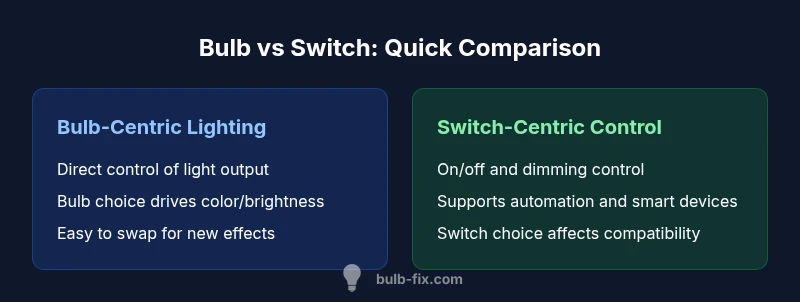
| Feature | Bulb-centric lighting | Switch-centric control |
|---|---|---|
| Control Method | Bulbs determine light output directly (depends on bulb type) | Switch controls power state to the bulb (on/off/dimming) |
| Energy Efficiency Impact | Depends on bulb type (LED vs incandescent) | Limited by switch unless integrated with smart controls |
| Upfront Cost | Depends on bulb type; bulbs are typically inexpensive to swap | Switch upgrades (dimmers/smart) add cost |
| Maintenance | Bulb replacements common | Switches may wear contacts but last longer |
| Best For | Reliability through straightforward bulbs | Automation and flexible control |
Upsides
- Clear ownership of light output by bulbs
- Easy upgrades by swapping bulbs
- Wide fixture compatibility
- Simple troubleshooting when issues arise
Drawbacks
- Smart setups can incur higher upfront costs
- Dimmer-switch compatibility can limit bulb choice
- More components can increase maintenance
Standard bulb+switch setups offer reliable, cost-effective lighting
For most homes, keep bulbs and switches as the primary pairing. Upgrade to smart tech if you want automation, but expect added complexity and cost.
Got Questions?
What is the difference between bulb and switch?
The bulb is the light-emitting load; the switch is the control that completes the circuit. The difference between bulb and switch is essential for diagnosing lighting issues and planning upgrades.
Bulbs light the room, switches turn the power on and off. That's the basic difference.
Can I use any bulb with any switch?
Most basic switches work with standard bulbs, but dimmers and smart switches require compatible bulb types. Always check compatibility charts.
Most bulbs will work with a basic switch, but dimmable or smart setups need matching switches and bulbs.
Are LED bulbs compatible with dimmer switches?
Many LEDs are dimmable, but not all. Use LED-compatible dimmers and bulbs to avoid flicker or limited dimming range.
LEDs can work with dimmers if both are designed for LED technology.
What should I consider when upgrading to smart lighting?
Evaluate whether your switches support automation or if you should swap in smart bulbs or smart switches. Consider hub compatibility and Wi-Fi reliability.
If you want automation, plan for smart bulbs or smart switches with good compatibility.
Does replacing a switch affect bulb life?
A failing switch can lead to power issues, but it doesn't directly affect bulb life. Replacing faulty switches helps overall reliability.
Switch health matters for reliability, but it doesn't wear bulbs faster by itself.
How do I troubleshoot a light that won't turn on?
Check other bulbs in the circuit, test the switch, and replace a faulty bulb if needed. If the circuit is controlled by a smart device, verify connectivity.
First check the switch and the bulb, then test if power is reaching the fixture.
Key Points
- Define load vs control roles early
- Prioritize light quality by choosing bulbs first
- Check dimmer compatibility with LEDs
- Consider future upgrades (smart bulbs or switches)
- Keep spare bulbs on hand for maintenance