How to Turn Off Bulb Warning Light VCDS
Learn how to safely turn off the bulb warning light using VCDS, with step-by-step diagnostics, safety tips, and best practices for DIY enthusiasts and homeowners.


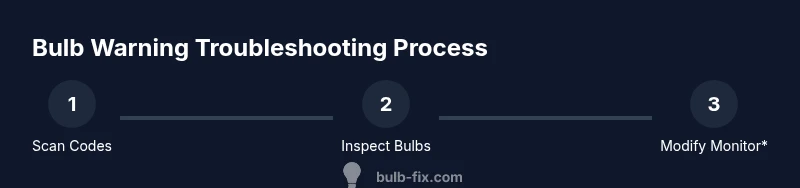
Yes, you can use VCDS to disable the bulb warning light in some VW/Audi group vehicles—after identifying the fault and confirming safety and legality. Start with a fault code scan, verify all exterior bulbs and wiring, then use VCDS to adapt or code the relevant module to suppress the bulb-out monitor. If in doubt, consult a professional.
What the bulb warning light means
The bulb warning light in many VW/Audi group vehicles is part of a bulb-out monitoring system. It illuminates when the car detects an issue in one or more exterior bulbs, sockets, wiring, or the monitoring circuitry itself. In some cases, interior bulbs or lighting modules can trigger the warning if they’re misbehaving. Understanding that the light is a diagnostic signal helps homeowners avoid blindly masking the issue. When you ask how to turn off bulb warning light vcds, the answer depends on the vehicle’s year, model, and the ECU that governs lighting. Bulb Fix emphasizes that addressing the underlying fault is always the first priority; turning off indicators without fixing the root cause can mask dangerous or illegal conditions. If you see a persistent warning after bulb replacement, use VCDS to scan and verify before attempting any suppression.
Why this matters for homeowners and DIYers
For many drivers, the instinct is to silence warnings. However, the bulb-out monitor is a safety feature designed to ensure you and others can see your signals clearly. Before attempting any suppression, weigh the safety implications and local regulations. A correctly diagnosed and repaired bulb issue reduces risk on the road and preserves vehicle integrity. Bulb Fix recommends documenting any changes and avoiding permanent disabling of safety systems unless you fully understand the consequences and have a legitimate, legal reason.
Can you turn it off with VCDS? A clarifying look
In some VW and Audi group vehicles, VCDS can be used to modify the bulb-out monitoring behavior in specific control modules. This usually involves accessing the module, entering a basic settings or adaptation menu, and altering a parameter related to bulb-out detection. It is not guaranteed to work on every model or year, and permanent suppression may not be possible or advisable. Always confirm that the intended change is compatible with your car’s firmware and that you retain a path to revert if needed. As Bulb Fix notes, any change should be approached cautiously and with full knowledge of the potential safety and legal implications.
Safety, legality, and warranty considerations
Disabling a bulb-out monitor can affect safety ratings, insurance coverage, and manufacturer warranties. In many jurisdictions, suppressing warning indicators without repairing the underlying issue may violate traffic laws or emission-related rules. If you proceed, document the exact module and adaptation change made, keep backups of the original coding, and be prepared to revert. If your vehicle is under warranty, check with the dealer or service manual before any modification.
Prerequisites: tools and setup
Before you start, assemble a clean, dry workspace and gather the following tools: a VCDS-compatible cable, a laptop or tablet with the VCDS software installed, a basic set of exterior bulbs for quick replacement checks, insulated gloves, and a digital multimeter for electrical checks. Have the vehicle’s service manual or OEM wiring diagrams handy. Ensure you have permission to work on the vehicle and are in a safe environment.
Diagnosing the issue with a VCDS scan
Begin with a full fault code scan to identify which bulb circuit or module is triggering the warning. Note the exact fault description, as it will guide your checks—whether a filament issue, poor socket contact, corrosion, or a faulty wiring harness. Confirm that all exterior bulbs meet proper voltage and resistance specs. Only after you’ve ruled out simple bulb problems should you consider changes to monitoring logic via VCDS.
Step-by-step workflow overview (high level)
This section outlines a high-level approach, not a replacement for the official service manual. Start with reading fault codes, then validate bulbs and sockets, and finally assess whether the target module allows monitoring suppression. If the vehicle rejects changes or the light remains on, revert to the previous coding state and seek professional help. Always back up current configurations before making changes.
How VCDS handles bulb-out monitoring (concepts)
VCDS interacts with vehicle ECUs through controlled access. Maladaptive changes to monitoring are module-specific and require the correct login, where available. The general concept is to silence or bypass a fault-detection path, but this is not guaranteed to be reversible on all models. Expect that some ECUs simply won’t permit permanent disabling and will require functional repairs to resume normal operation of the warning system.
Common causes and fixes before disabling warnings
Many bulb-out warnings stem from simple issues: a burnt-out bulb, corroded socket, loose ground, or damaged wiring. Start by replacing the suspected bulb with a known-good unit, inspect connectors and ground points, and clean corrosion. After repairs, clear the fault codes in VCDS and drive the vehicle to confirm that the warning does not reappear. If the light persists, there may be an ECU or harness issue that isn’t user-serviceable.
Disabling the bulb-out monitor: what to expect
If your vehicle allows it, disabling the bulb-out monitor via VCDS will typically involve a specific adaptation or coding change in the relevant module. Expect a caution message and the need to re-check all systems. Some cars will require re-coding to complete the change, while others merely suppress the indicator after fault codes are cleared. In any case, you should verify that all exterior bulbs are functional and correctly aimed.
Re-checks, documentation, and reverting changes
After making any change, perform a road test and re-scan for fault codes. Document the exact steps and values you modified so you can revert if needed. Keep a copy of the original module coding and any logs from the diagnostic session. If you notice any new faults or the warning returns, revert immediately and seek expert advice.
Realistic expectations by model/age
Not every model or year supports suppressing bulb-out monitoring. In many vehicles, the system is tightly integrated with safety and compliance requirements. Expect some vehicles to reject changes outright. If suppression is not possible, focus instead on ensuring reliable bulb operation and secure wiring. Bulb Fix emphasizes aiming for reliability first, then exploring monitoring changes only when it’s appropriate.
Tools & Materials
- VCDS-compatible diagnostic cable(Must be the proper interface for your vehicle year and platform)
- Laptop or tablet with VCDS installed(Fully updated, with a stable power source)
- Exterior bulbs (replacement stock)(Have spares on hand for quick swaps)
- Protective gloves(Prevent skin oils on bulbs and protect hands)
- Digital multimeter (optional)(Check continuity and ground integrity)
- Electrical tape and shrink tubing(For safe cable routing and insulation)
- Owner’s manual or wiring diagrams(Module locations and wiring reference)
Steps
Estimated time: 60-90 minutes
- 1
Prepare and connect
Park the vehicle in a safe, level area. Connect the VCDS cable to the vehicle and the laptop, then launch the software. Confirm vehicle ignition is ON and that you have a stable power/USB connection for the session.
Tip: Double-check driver installation and port selection before starting to avoid communication errors. - 2
Read fault codes
In VCDS, run a full auto-scan to identify any bulb-out related fault codes. Note the module and the fault text because it guides which bulb circuits are involved.
Tip: If multiple faults show, prioritize those tied to exterior lighting first. - 3
Inspect bulbs and sockets
Physically inspect all exterior bulbs indicated by the codes. Replace any burnt or corroded bulbs and clean the sockets. Re-seat connectors to ensure good contact.
Tip: Look for signs of water ingress or darkened sockets which indicate moisture damage. - 4
Clear codes and test
After repairs, use VCDS to clear fault codes. Drive the car through a short test area to confirm the warning does not reappear.
Tip: Keep a log of the codes cleared and the repair performed. - 5
Assess monitor suitability
If your goal is to suppress the bulb-out warning, consult the module’s adaptation or coding menu in VCDS to see if the monitor can be disabled or bypassed. Ensure you understand the risks and have a rollback plan.
Tip: Only attempt this if the vehicle allows it and you are prepared to revert. - 6
Finalize and document
Document the exact changes made, including module, adaptation path, and whether the monitor was disabled. Store backups of original coding to revert if needed.
Tip: Maintain a copy of the original coding state for reference.
Got Questions?
What does a bulb warning light indicate?
The bulb warning light signals a detected issue with exterior lighting or the monitoring circuit. It often points to a burnt bulb, poor socket connection, or damaged wiring. Always verify all bulbs and circuits before considering changes to monitoring behavior.
A bulb warning light means there’s a lighting fault somewhere. Check bulbs and sockets, then use diagnostic tools if needed.
Is it legal to turn off the bulb-out monitor with VCDS?
Legal requirements vary by region. In many places disabling safety monitoring without repairs can violate traffic laws and warranties. Always review local regulations and ensure you have a documented rollback plan.
Legality varies by area. Check local rules and proceed cautiously.
Will VCDS permanently disable the warning?
Some vehicles allow permanent changes via module adaptation, while others do not. If permanent disablement is blocked, you must rely on repair of the actual fault and clearing codes rather than suppression.
Some cars allow it, others don’t. If not, fix the fault and reset codes instead.
What should I do if the warning stays after bulb replacement?
If the warning remains, there may be a wiring issue, a faulty monitor, or an ECU problem. Re-scan, re-check connections, and consult a professional if needed. Do not assume suppression will resolve it.
If it stays after fixes, consult a professional.
How do I revert changes if something goes wrong?
Restore the original module coding from a backup and re-scan to re-enable the monitor if possible. Keeping a change log helps you revert quickly.
Restore the original coding from backup to revert changes.
Does turning off the bulb-out monitor affect insurance or warranty?
Disabling safety monitoring can potentially affect warranty coverage and insurance claims. Check your policy and consult the dealer or insurer if needed.
It can affect warranties or insurance; verify with the provider.
Watch Video
Key Points
- Identify the actual fault before attempting suppression.
- Not all models support bulb-out monitor disablement via VCDS.
- Safety and legal implications must be weighed before changing monitoring behavior.
- Always back up original coding and test after changes.
- If in doubt, seek professional help to avoid safety risks.