Light bulb does not work: Troubleshooting Guide
Discover fast, safe steps when a light bulb does not work. Bulb Fix guides homeowners through checks, fixes, and a step-by-step plan to restore lighting fast.


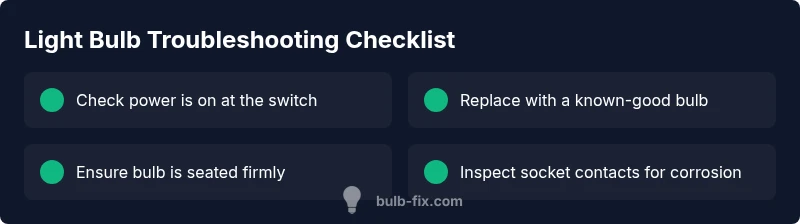
Most often, a light bulb does not work because the bulb is burned out or not seated properly. Start by replacing the bulb with a known-good one, then reseating firmly in the socket and testing the switch. If it still fails, check the fixture, fuse or breaker, and examine the socket contacts for corrosion.
Why a light bulb does not work
If your light bulb does not work, the problem is often straightforward and fixable. According to Bulb Fix, many light bulb failures are caused by a burned-out bulb, a loose or poor connection, or a bulb that isn't fully seated in the socket. The symptom "light bulb does not work" shows up in kitchens, living rooms, and bedrooms across millions of homes, so approaching the issue methodically saves time and prevents wasted replacements. This guide is designed for homeowners and DIY enthusiasts who want urgent, practical lighting fixes that are also safe.
Quick checks you can safely perform
Before you start, switch off power to the fixture at the wall or circuit breaker. Then, perform these quick checks:
- Inspect the bulb and replace it with a known-good replacement. Use a bulb of the same type and wattage as rated on the fixture.
- Gently reseat the bulb by turning it one quarter to one half turn until it sits snugly in the socket.
- Check the control switch and the fixture. A loose switch or a poor socket contact often causes the bulb not to light.
- If you’re comfortable, test the fixture in a different outlet or with a different light fixture to rule out the outlet or circuit as the cause.
- For LED bulbs, ensure the fixture isn’t a dimmer-only circuit or incompatible with the LED. bulbs can fail for reasons beyond a simple burn-out.
Diagnostic flow: symptom → diagnosis → solutions
Symptoms such as a light bulb not turning on can point to several causes. Bulb Fix analysis shows that the most common culprits are a burned-out bulb or a loose/corroded socket contact. If a replacement bulb still does not light, investigate the socket, switch, and wiring. The diagnosis progresses from simple to complex: 1) dead bulb, 2) seating/connection issues, 3) wiring or switch problems, 4) fixture or circuit faults. Solutions follow the diagnosis: replace the bulb (or reseat), tighten contacts, replace the socket or switch, or consult an electrician for wiring or panel issues.
Step-by-step: fix the most common cause (burned-out or poorly seated bulb)
- Safety first: turn the power off at the switch and, if accessible, the circuit breaker. 2) Remove the current bulb and inspect its glass for darkened glass or scorch marks, which indicate a burned-out bulb. 3) Install a fresh bulb of the correct type and rating. 4) Gently rotate the bulb until it is snug in the socket. 5) Turn the power back on and test the fixture. 6) If the bulb still does not light, inspect the socket for corrosion and ensure the metal contacts are clean and not bent out of shape.
Safety tips, common mistakes, and warnings
- Always handle bulbs with dry hands or wear gloves to avoid transferring oils to the glass. This helps with longevity for incandescent and halogen bulbs. For LEDs, avoid excessive torque when seating the bulb.
- Do not force a bulb into a socket if it does not seat smoothly; this can bend contacts or damage the fixture.
- If you smell burning or hear buzzing after replacing a bulb, turn off power immediately and check for damaged wiring or a failing switch.
- If you’re unsure about wiring or a defective socket, stop and call a licensed electrician. Electrical work can be dangerous.
Preventing future bulb failures
- Use the correct wattage and type for each fixture. Mismatched bulbs are a common cause of early burnout or poor performance.
- Regularly inspect sockets for signs of corrosion or looseness, especially in ceiling fixtures and outdoor lights.
- Clean contacts gently with a dry cloth if you notice poor contact or flickering, but never use liquids on live components.
- Install bulbs in fixtures that match their purpose (e.g., dimmable bulbs in dimmable fixtures; moisture-rated bulbs in bathrooms or outdoors).
Practical care for different bulb types and fixtures
- Incandescent and halogen bulbs: handle with care, avoid overtightening, and ensure proper ventilation around hot lamps.
- LEDs: verify compatibility with dimmers and fixtures; replace with similar color temperature to maintain room ambiance.
- Fluorescent: check ballast and ensure the fixture is rated for fluorescent lamps; wear eye protection if replacing in high or dusty fixtures.
- Outdoor bulbs: use weather-rated bulbs and check seals to prevent moisture ingress.
Steps
Estimated time: 30-60 minutes
- 1
Power down and prep
Turn off power to the fixture at the wall switch and, if safe, the circuit breaker. This prevents shocks while you handle bulbs and sockets. Check that you have a stable working area and adequate lighting before you begin.
Tip: Always start with power off; never attempt bulb work while the circuit is live. - 2
Remove the old bulb
Carefully unscrew the bulb by turning counterclockwise. If the bulb is hot, wait a minute or two for it to cool before touching it. Inspect the bulb for darkened glass or signs of burnout.
Tip: If the bulb feels stuck, do not force it; try a gentle wiggle while keeping it straight. - 3
Install a new bulb
Insert a new bulb of the same type and wattage. Seat it firmly by turning clockwise until snug, then avoid over-tightening which can strip the socket.
Tip: Use a known-good replacement to minimize variables during testing. - 4
Test the fixture
Restore power and flip the switch. If the bulb lights, you’re finished. If not, proceed to check the socket contacts and wiring.
Tip: If you have a spare lamp, test the bulb there to confirm bulb functionality. - 5
Inspect the socket and contacts
Look for bent, corroded, or loose contacts inside the socket. Gently adjust with insulated tools and clean any corrosion with a dry cloth if safe to do so.
Tip: Do not use liquids or harsh cleaners on electrical contacts. - 6
Evaluate the fixture and circuit
If the bulb still does not light after testing, consider a faulty fixture or wiring. Check the switch wiring and test the fixture in a known-good power source or outlet.
Tip: When in doubt, contact a licensed electrician for wiring concerns.
Diagnosis: Light bulb not turning on
Possible Causes
- highBurned-out bulb
- highBulb not seated properly
- mediumLoose or corroded socket contact
- mediumFaulty switch or wiring in the fixture
- lowCircuit breaker or fuse tripped
Fixes
- easyReplace the bulb with a known-good one and reseat firmly in the socket
- mediumInspect and clean socket contacts; gently bend any bent contacts back into place
- mediumTest the switch and replace if faulty; check wiring connections at the fixture
- easyCheck the circuit breaker/fuse and reset or replace if needed; call an electrician if the issue persists
- hardReplace the defective socket or fixture if corrosion or damage is evident
Got Questions?
Why won't my bulb light after replacement?
The most common reasons are a bad socket, a loose connection, or an incompatible fixture. Start by checking seating and contacts, then try the replacement bulb again. If it still fails, inspect the switch and wiring or consult an electrician.
Common causes are a bad socket, loose contacts, or an incompatible fixture. Start with seating and contacts and try a new bulb; if it still fails, check the switch and wiring or call a professional.
Is flickering normal?
Flickering is usually a sign of loose contacts, a failing switch, or an incompatible dimmer. Check the bulb seating, switch integrity, and dimmer compatibility before replacing components.
Flickering is usually due to loose contacts or a bad switch. Check seating and the dimmer compatibility before replacing parts.
Can I mix bulb types in a fixture?
Mixing bulb types in a single fixture can cause performance issues and uneven lighting. Use bulbs of the same type, wattage, and color temperature recommended by the fixture.
Avoid mixing bulb types in one fixture; use bulbs with the same type, wattage, and color temperature as recommended.
Should I call an electrician?
If you suspect wiring damage, a defective socket, or recurring circuit issues, stop and contact a licensed electrician. Electrical work can be dangerous if you’re not trained.
Call an electrician if you suspect wiring damage or persistent circuit issues. Safety first.
What about dimmers and smart bulbs?
Ensure bulbs are compatible with dimmers or smart controls. Incompatibility can cause flicker, reduced brightness, or failure to light.
Make sure your bulbs are compatible with dimmers or smart controls to avoid flicker or non-light issues.
Why does it smell burnt plastic from the fixture?
A burnt smell usually indicates overheating due to a faulty socket or wiring. Turn off power immediately and inspect; call a professional if you’re unsure.
A burnt smell means overheating—turn off power and inspect. If unsure, call a professional.
Watch Video
Key Points
- Identify the simple causes first and re-seat the bulb.
- Replace with a known-good bulb to verify fixture function.
- Inspect socket contacts for corrosion or looseness.
- If issues persist, check switch/wiring or call an electrician.
- Prevent future failures with correct wattage and regular socket checks.